
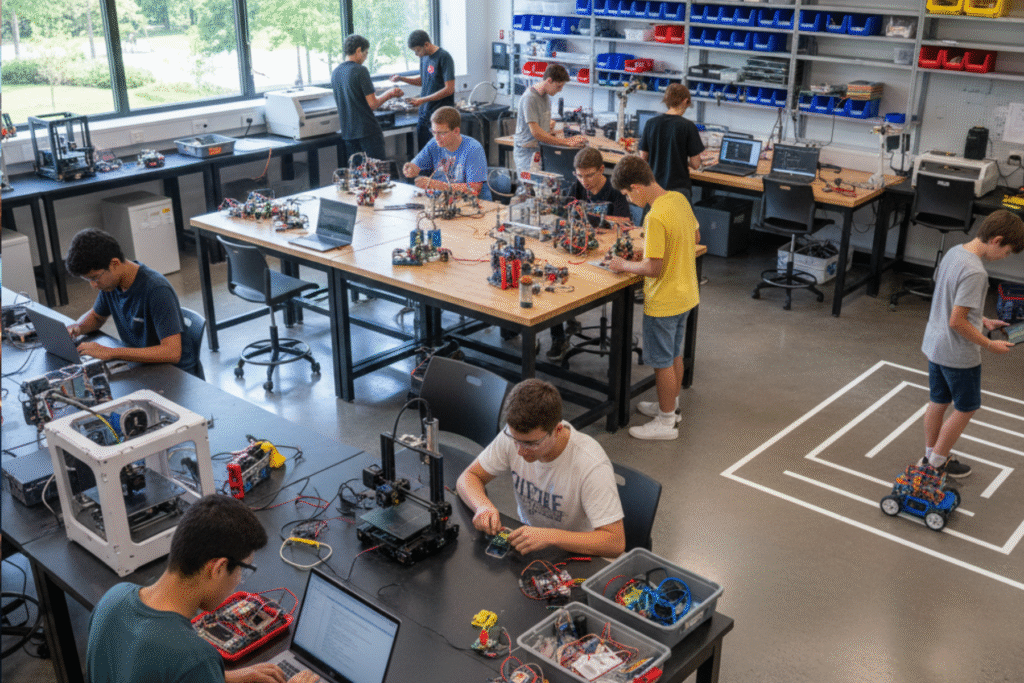
In our previous discussion, we explored the crucial steps in Curriculum Development for Robotics. Now that you have a compelling curriculum taking shape, the next logical question is: what do you need to bring that curriculum to life? The answer lies in setting up an effective robotics lab. This isn’t just about buying a few kits; it’s about creating an environment that fosters experimentation, collaboration, and real-world problem-solving.
Here’s a breakdown of the essential components for a thriving robotics lab in schools:
1. Robotics Kits: The Building Blocks of Innovation
This is often the first thing people think of, and for good reason. Robotics kits provide a structured entry point into the world of building and programming. The choice of kit will largely depend on your student demographic and curriculum goals.
- For Younger Students (Elementary/Middle School):
- LEGO Mindstorms/SPIKE Prime: Excellent for introducing basic engineering concepts, sensors, and block-based programming in an intuitive, engaging way. Their modular nature makes them highly versatile.
- Dash & Dot/Ozobots: Great for very young learners to understand coding logic through play, often screen-free or with simplified interfaces.
- For Older Students (Middle/High School):
- VEX Robotics: Offers a more robust and scalable platform suitable for advanced engineering design, metal construction, and competitive robotics.
- Arduino/Raspberry Pi Starter Kits: These open-source platforms are fantastic for teaching fundamental electronics, C++ or Python programming, and custom circuit building. They offer immense flexibility for advanced projects.
- Drones & ROVs (Remotely Operated Vehicles): Introducing drone technology or simple underwater ROVs can be incredibly engaging, teaching principles of aerodynamics, hydrodynamics, and remote control.
When selecting kits, consider factors like reusability, expandability, and the availability of lesson plans and community support. Having a mix of different kits can cater to varied interests and skill levels.
2. Computing Power and Software: The Brains Behind the Bots
Robots don’t just build themselves; they need to be programmed! Adequate computing resources are paramount.
- Computers/Laptops: Each student or pair of students should have access to a computer capable of running the necessary programming environments (IDEs), CAD software, and simulation tools. Modern laptops or desktop PCs are generally sufficient. Tablets can also be useful for block-based programming interfaces, especially for younger learners.
- Operating Systems: While Windows and macOS are common, consider having some Linux machines (or dual-boot setups) if you plan to delve into advanced robotics using tools like ROS (Robot Operating System) which is primarily Linux-based.
- Programming Environments (IDEs):
- Block-based: Scratch, Blockly, EV3/SPIKE Prime software (for LEGO kits).
- Text-based: Arduino IDE, Python IDLE or VS Code (with Python extensions), Java IDEs.
- Simulation Software: Tools like Gazebo or CoppeliaSim allow students to test their code in a virtual environment before deploying it to physical robots, saving time and preventing damage.
- CAD Software: For designing custom parts for 3D printing or laser cutting, free tools like Tinkercad (beginner-friendly) or Fusion 360 (more advanced, often free for educational use) are invaluable.
- Version Control: Introduce Git and GitHub to older students for collaborative coding, tracking changes, and managing projects like professionals.
Ensure your school’s network infrastructure can handle the demands of multiple devices accessing software, updates, and online resources simultaneously. Reliable Wi-Fi is a must.
3. Basic Electronics and Tools: Beyond the Kits
While kits are great, a true robotics lab goes beyond pre-packaged solutions. Equipping students with fundamental electronics knowledge and tools is critical for deeper understanding and custom builds.
- Breadboards and Jumper Wires: Essential for prototyping circuits without soldering.
- Multimeters: For measuring voltage, current, and resistance – fundamental for troubleshooting.
- Soldering Stations: For more permanent circuit connections. Include safety equipment like fume extractors and safety goggles.
- Basic Electronic Components: Resistors, capacitors, LEDs, diodes, potentiometers, transistors, buzzers, and various sensors (light, temperature, ultrasonic, IR, force).
- Power Supplies: Benchtop power supplies provide stable and adjustable voltage for testing circuits.
- Hand Tools: Screwdriver sets (Phillips, flathead, hex), pliers (needle-nose, cutting), wire strippers, small wrenches.
- Storage: Organized bins and cabinets for components and tools are crucial for a functional and tidy lab.
4. Fabrication Equipment: Bringing Designs to Life
To truly empower students to innovate, provide them with the means to create custom parts.
- 3D Printers: These are becoming increasingly affordable and are game-changers for rapid prototyping custom brackets, gears, robot chassis, and enclosures. FDM (Fused Deposition Modeling) printers are generally sufficient for school labs.
- Filament: A good supply of PLA or PETG filament in various colors.
- Laser Cutter/Engraver: (Optional, but highly recommended for older students) Allows for precise cutting and engraving of materials like wood, acrylic, and cardboard, enabling more complex robot designs and custom enclosures.
- Basic Workshop Tools: Small vises, clamps, files, sandpaper, and safety equipment.
5. Workspace and Infrastructure: The Physical Environment
The physical layout and resources of your lab significantly impact learning and collaboration.
- Workbenches/Tables: Sturdy, spacious tables that can accommodate multiple students and their projects. Consider adjustable height tables for flexibility.
- Power Outlets: Abundant, easily accessible power outlets at each workstation.
- Storage: Ample shelving, cabinets, and drawers for organizing kits, tools, components, and student projects. Clear labeling is key.
- Testing Areas: Designated open spaces for testing robot navigation, movement, and interactions. Consider creating a modular arena with configurable walls or lines for competition practice.
- Whiteboards/Smartboards: For instruction, brainstorming, and collaborative problem-solving.
- Safety Equipment: First aid kit, fire extinguisher, safety goggles (mandatory for soldering, 3D printing, laser cutting), and clear safety protocols posted visibly.
- Internet Connectivity: Reliable high-speed internet is essential for accessing online resources, software updates, and cloud-based tools.
6. Consumables and Miscellaneous: The Day-to-Day Essentials
Don’t forget the small but crucial items that keep the lab running.
- Batteries and Chargers: Rechargeable batteries (AA, AAA, LiPo for advanced projects) are a must.
- Adhesives: Hot glue guns, super glue, double-sided tape.
- Zip Ties/Velcro: For cable management and temporary attachments.
- Cleaning Supplies: To maintain a tidy and safe environment.
- Prototyping Materials: Cardboard, foam board, craft sticks – inexpensive materials for quick mock-ups.
Conclusion
Setting up a robotics lab is an investment in your students’ future. It requires careful planning and a commitment to providing the right tools and environment. By thoughtfully selecting robotics kits, providing robust computing resources, equipping students with fundamental electronics and fabrication tools, and designing an effective workspace, you’ll create a dynamic learning environment where students can turn theoretical knowledge into tangible, working robots. This hands-on experience, coupled with a well-designed curriculum, will be instrumental in nurturing the next generation of innovators who are not just users of technology, but its creators.