
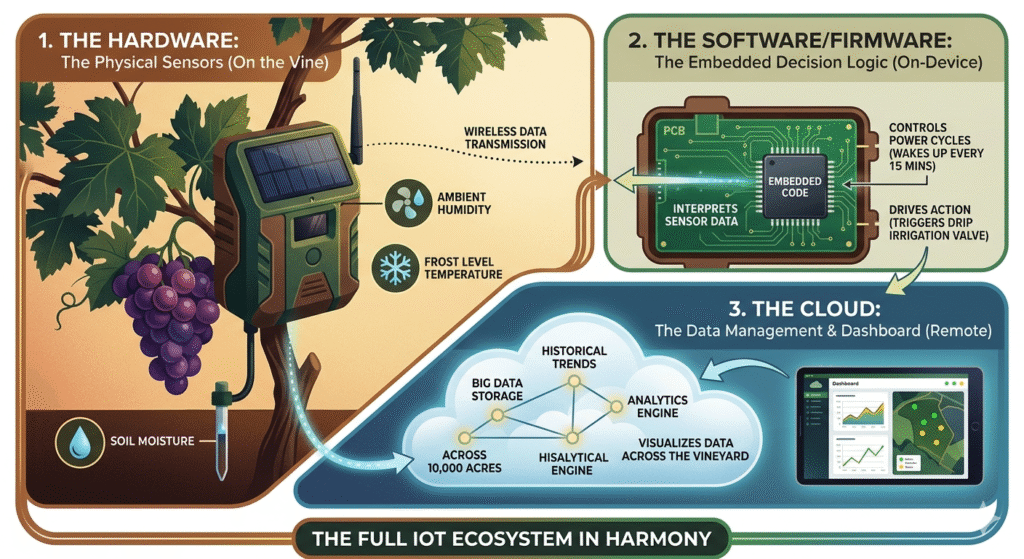
Imagine a smart vineyard in Napa Valley. A small, solar-powered device no bigger than a deck of cards is attached to a vine. It wakes up every 15 minutes, measures the precise moisture content of the soil, captures the ambient humidity, and checks if the temperature has dipped near frost levels. It sends this data wirelessly to a dashboard. When the soil gets too dry, the system automatically triggers a valve to start drip irrigation.
This device is a marvel of modern engineering—but where does the “intelligence” actually live? Is it in the rugged plastic enclosure that protects the circuit board? Is it in the code that decides when to send an alert? Or is it in the cloud application that visualizes the data across 10,000 acres?
For product managers, hardware engineers, and startup founders, failing to answer that question—failing to understand the distinct roles of Hardware, Software/Firmware, and Cloud—is the fastest path to a failed IoT product.
Building a connected device isn’t just about making a “thing” smart; it’s about orchestrating a system where three distinct layers work in perfect harmony. In this post, we will break down the responsibilities, strengths, and limitations of each layer, and explain why treating them as separate projects is a recipe for disaster.
The IoT Technology Stack Overview
Before diving into the details, let’s establish a common framework. The IoT technology stack is often visualized in layers, moving from the physical world to the digital interface.
| Layer | Component | Role |
| Perception Layer | Hardware | Interacts with the physical environment (sensors, actuators) and provides the physical foundation. |
| Network Layer | Connectivity | Transports data from the device to the cloud (Wi-Fi, Cellular, LoRa, BLE). |
| Middleware Layer | Firmware & Cloud | Processes data, manages devices, and handles business logic (often split between device and cloud). |
| Application Layer | Cloud & UI | Delivers insights, dashboards, user authentication, and integrations with other enterprise systems. |
Now, let’s zoom in on the three core pillars that make this stack function.
1. The Role of IoT Hardware
Hardware is the skeleton and nervous system of an IoT product. It is the tangible interface between the digital bits of the cloud and the physical atoms of the real world. If the hardware fails, nothing else matters.
What It Does
IoT hardware encompasses the physical components that acquire data and initiate action. This includes:
- Sensors: Temperature, pressure, motion, humidity, vibration.
- Actuators: Motors, relays, valves, switches (to do something based on data).
- Microcontrollers (MCUs) / Microprocessors (MPUs): The low-power “brains” that run the firmware.
- Connectivity Modules: Wi-Fi chips (ESP32), Cellular modems (4G/5G), LPWAN modules (LoRa, NB-IoT).
- Power Management: Batteries, energy harvesting circuits, voltage regulators.
- PCBs & Enclosures: The physical structure and protection against environmental factors (water, dust, vibration).
Key Responsibilities
- Physical World Interaction: Converting a physical phenomenon (like pressure) into a measurable electrical signal.
- Edge-Level Processing: While often minimal, modern hardware can handle basic filtering and logic to offload the cloud.
- Power Efficiency: For battery-powered devices, hardware selection is the primary driver of device lifespan. A poorly chosen cellular module can drain a battery in days; a properly chosen LPWAN module can last years.
- Durability: Ensuring the device can withstand the operating environment—be it a 150°C industrial oven or a sub-zero outdoor sensor.
Challenges
- Cost & BOM: Bill of Materials (BOM) costs scale linearly. Saving $0.50 on a component saves $50,000 over 100,000 units, but the wrong choice can kill reliability.
- Manufacturing Complexity: Moving from a breadboard prototype to a certified, manufacturable PCB (Printed Circuit Board) is a monumental leap.
- Certification: Devices must pass FCC, CE, and carrier-specific certifications (for cellular), adding significant time and cost.
Real-World Example: A cold chain monitor for pharmaceutical vaccines relies on a high-precision temperature sensor (hardware) placed in a thermally isolated enclosure. If the sensor is inaccurate by 0.5°C, a batch of life-saving vaccines could be falsely flagged as spoiled—or worse, administered when ineffective.
Skills Required: Electronics Engineering, PCB Layout, RF Engineering, Thermal Management, Mechanical Engineering.
2. The Role of IoT Software / Firmware
If hardware is the body, firmware is the central nervous system. This is the low-level software that runs on the microcontroller. It’s the glue that holds the hardware together and connects it to the cloud.
What It Does
Firmware sits directly on the hardware and manages the device’s core operations. It differs from “software” (like a mobile app) because it is tightly coupled to the specific hardware it runs on.
- Boot Sequence & Drivers: Initializes the hardware components (e.g., “wake up the GPS module”).
- Sensor Fusion & Filtering: Reads raw sensor data and cleans it. For instance, applying a median filter to remove “noise” from a vibration sensor so you don’t send false alerts every time a truck drives by.
- Local Decision Making (Edge Computing): Executes logic without needing the cloud. Example: “If the water level exceeds 90%, turn on the pump immediately—do not wait for cloud instructions.”
- Communication Protocols: Manages the connection stack (MQTT, CoAP, HTTPS) to ensure data is reliably transmitted.
- Security: Handles device attestation, secure boot, encryption keys, and certificate management.
- Over-the-Air (OTA) Updates: Downloads new firmware images from the cloud, verifies their integrity, and updates the device without physical access.
Why It’s the “Brain”
Firmware determines the device’s behavior. Two identical hardware boards can behave completely differently based on the firmware flashed onto them. It acts as the translator, taking complex cloud commands (e.g., “Start calibration sequence”) and breaking them down into specific hardware actions (e.g., “Set GPIO pin 12 high for 2 seconds”).
Challenges
- Resource Constraints: Firmware developers operate in a world of kilobytes of RAM and limited CPU cycles. There’s no room for bulky, inefficient code.
- Real-Time Requirements: For safety-critical applications (like braking in a connected vehicle), the firmware must guarantee a response within milliseconds.
- Debugging Difficulty: Debugging a device deployed in a remote oil field is notoriously difficult. Firmware must be robust enough to self-recover (watchdog timers) and log errors effectively.
Real-World Example: A predictive maintenance sensor on a factory motor. The firmware doesn’t just send raw vibration data every second (which would overwhelm the cloud and drain the battery). Instead, it runs a Fast Fourier Transform (FFT) algorithm locally to calculate the vibration spectrum, only sending an alert—and a snippet of data—if the frequency pattern indicates a bearing is about to fail.
Skills Required: Embedded C/C++, Rust, Real-Time Operating Systems (RTOS), Protocol Stacks (MQTT, BLE), Cryptography.
3. The Role of the Cloud (and Backend)
The cloud is the central nervous system for the fleet of devices. It provides the persistent intelligence, scalability, and data processing power that a single device cannot possess.
What It Does
- Device Provisioning & Identity: Securely onboarding thousands or millions of devices, ensuring each has a unique, verifiable identity.
- Data Ingestion: Handling massive, high-throughput streams of telemetry data. A single gateway might handle 10,000 messages per second.
- Storage: Long-term storage of historical data (time-series databases) for analysis, compliance, and machine learning training.
- Advanced Analytics & AI/ML: Running complex algorithms on aggregated data. Example: Analyzing vibration data from 10,000 motors to identify a failure pattern that no single motor could show.
- Rule Engines & Automation: Creating business logic that spans multiple devices. Example: “If 10 devices in Zone A report a temperature drop, automatically send a weather alert to all devices in Zone B.”
- Over-the-Air (OTA) Management: Orchestrating the rollout of firmware updates to fleets, including gradual rollouts (canary deployments) and rollbacks.
- Visualization & APIs: Serving dashboards to users and providing RESTful APIs for integration with ERPs, CRMs, or mobile apps.
The Edge vs. Cloud Decision Framework
One of the most critical architectural decisions is deciding where processing happens.
| Factor | Process at the Edge (Device/Gateway) | Process in the Cloud |
| Latency | Critical. Sub-millisecond response (e.g., safety shut-off). | Tolerant. Analytics for daily reports, dashboard updates. |
| Connectivity | Unreliable/Intermittent. Device must work offline. | Stable, high-bandwidth. Constant connection is viable. |
| Data Volume | High. Sending raw data would be too expensive. | Low. Device can send aggregated summaries. |
| Computational Power | Simple/Moderate. Filtering, thresholds, basic AI. | Complex. Deep learning, fleet-wide optimization, big data. |
| Cost Sensitivity | High. Cloud compute and data transfer costs must be minimized. | Moderate. Economies of scale for processing power. |
Challenges
- Latency: Network round-trips can introduce delays of hundreds of milliseconds to seconds, making real-time control impossible.
- Vendor Lock-in: Choosing a cloud provider (AWS, Azure, Google) dictates your architecture, data formats, and even some hardware choices.
- Cost at Scale: Cloud costs grow with data ingestion, storage, and compute. A “free” prototype can cost hundreds of thousands of dollars a month at scale if not architected efficiently.
Popular Platforms: AWS IoT Core, Microsoft Azure IoT Hub, Google Cloud IoT Core, and open-source stacks like ThingsBoard or Losant.
4. How Hardware, Software, and Cloud Work Together (The Synergy)
Treating these three layers in isolation is the “silo trap” that kills IoT projects. The reality is a symbiotic relationship where decisions in one layer directly impact the others.
The Data Flow
- Hardware (Sensor) detects a physical event.
- Firmware reads the signal, applies calibration, and packages the data into an MQTT packet.
- Connectivity (Cellular/LoRa) transmits the packet.
- Cloud ingests the packet, routes it through a rule engine, and stores it.
- Cloud runs analytics and updates a dashboard.
- Cloud sends a command back down the stack.
- Firmware interprets the command and drives an actuator (Hardware).
Interdependencies
- Hardware impacts Cloud Costs: If you choose a high-power LTE modem, you might send data less frequently to save battery. But if the firmware has a bug and sends heartbeats every 10 seconds instead of every hour, your cloud data ingestion bill will skyrocket.
- Firmware impacts Reliability: Poorly written firmware that crashes every week requires a hardware watchdog or a physical reboot. In remote locations, this means truck rolls (expensive service visits) to manually reset a device that is otherwise perfectly fine.
- Cloud impacts Hardware Design: If you decide to use AWS IoT Device Defender for security, your hardware must support the necessary cryptographic engines to handle mutual TLS authentication. If it doesn’t, you’re stuck with a hardware respin.
Common Pitfalls
The most common failure is building the hardware first, then asking, “Okay, now how do we connect it to the cloud?” This often results in:
- Missing security features (no secure element for keys).
- Insufficient flash memory for future OTA updates.
- A connectivity module that doesn’t support the chosen cloud protocol.
5. Link to the Complete IoT Product Development Roadmap
This breakdown of hardware, software, and cloud is not just an academic exercise; it is the foundational framework for the entire product lifecycle.
When you start building a connected product, you don’t design the hardware, then the firmware, then the cloud. You design the system. Understanding these roles early allows you to make better decisions during:
- Idea Validation: Is the problem solved with a simple edge device, or does it require complex cloud analytics?
- System Architecture: Defining the interface (API) between firmware and cloud before a single line of code is written.
- Prototyping: Building a “full-stack” prototype that tests the hardware’s ability to collect data, the firmware’s ability to process it, and the cloud’s ability to manage it.
- Scalability: Choosing the right hardware (flash, RAM) and cloud data models that won’t break when you go from 10 to 10,000 units.
As outlined in our comprehensive guide, The Complete IoT Product Development Roadmap: From Idea to Scalable Deployment, the most successful IoT products are those where hardware, software, and cloud decisions are made together from day one rather than as afterthoughts.
6. Best Practices and Recommendations
To navigate the complexities of IoT development, follow these guidelines:
- Start with Architecture: Before selecting a specific chip or cloud provider, define the architecture. Use a diagram to map out the data flow, security boundaries, and where processing (edge vs. cloud) occurs.
- Prototype the Full Stack: Don’t just get the LED blinking on a dev board. Connect that prototype to your actual cloud backend to test latency, data payload sizes, and OTA update mechanics.
- Prioritize Security from Day One: Implement security at all three layers:
- Hardware: Use a Secure Element (SE) or Trusted Platform Module (TPM) to store cryptographic keys.
- Firmware: Implement secure boot and encrypted communication (TLS).
- Cloud: Use strict identity and access management (IAM) and device authentication.
- Plan for the Unseen: Assume devices will lose connectivity. Design firmware to store data locally (store-and-forward) and handle power interruptions gracefully.
- Choose the Right Balance: Use the Edge vs. Cloud framework to decide where to process data. A common rule of thumb: If it needs to happen faster than a human can react (sub-500ms) or if the data volume is too high to transmit, process it at the edge.
Comparison Table: Hardware vs. Firmware vs. Cloud
| Feature | Hardware | Firmware (Embedded Software) | Cloud (Backend) |
| Responsibility | Physical sensing, actuation, power | Device control, data handling, connectivity | Data aggregation, analytics, fleet management |
| Strengths | Durability, physical reliability | Low latency, offline capability | Scalability, complex processing, AI/ML |
| Limitations | High upfront cost, fixed functions | Resource constraints (RAM/Flash), hard to debug | Latency, recurring operational costs |
| Key Tools | Altium, Eagle, Oscilloscopes | C/C++, Rust, FreeRTOS, ESP-IDF | AWS IoT, Azure IoT, Node-RED, TimescaleDB |
| Update Cycle | Months (hardware revisions) | Weeks (OTA updates) | Hours (continuous deployment) |
7. Conclusion
The magic of the Internet of Things isn’t found in a single component. It isn’t in the sensor that captures data, nor is it solely in the cloud dashboard that visualizes it. The true value lies in the orchestration—the seamless, invisible handoff between hardware, firmware, and cloud.
- Hardware provides the eyes, ears, and hands.
- Firmware provides the instincts and reflexes.
- Cloud provides the memory and collective intelligence.
For product managers, engineers, and founders, success depends on breaking down the silos. You cannot design a cost-effective device without understanding cloud data costs, and you cannot build a secure device without choosing hardware that supports modern cryptographic standards.
By understanding the distinct roles and their interdependencies, you are ready to tackle the next stage: building the roadmap.
Ready to turn your idea into a scalable reality? Dive deeper into the full lifecycle of product creation, from concept validation to mass deployment, in our comprehensive pillar guide.
Continue Reading: The Complete IoT Product Development Roadmap: From Idea to Scalable Deployment →
FAQs
Q1: Which is more important: the hardware or the cloud?
Neither. They are equally critical. A great cloud platform cannot fix a hardware device that fails in the field due to poor power management. Conversely, the best hardware is useless if it cannot be securely managed or provide insights at scale via the cloud. IoT is a system, and the system is only as strong as its weakest component.
Q2: Can I use Wi-Fi for my industrial IoT device?
It depends. Wi-Fi is great for high-bandwidth, AC-powered devices. However, for battery-powered sensors in remote areas, Wi-Fi’s power consumption and limited range make it a poor choice. In these cases, LPWAN technologies like LoRaWAN or NB-IoT are often better suited for the hardware layer.
Q3: What is the difference between firmware and software in IoT?
Firmware is the low-level code that runs directly on the microcontroller (MCU) of the IoT device. It is hardware-specific and manages the device’s core operations. “Software” usually refers to higher-level applications like the mobile app, web dashboard, or backend services running in the cloud. Firmware controls how the device works; software controls what the user does with the data.
Q4: How do I decide between edge computing and cloud computing?
Use edge computing (on the device) when you need real-time response (sub-second), have intermittent connectivity, or need to reduce bandwidth/costs by filtering data locally. Use cloud computing when you need to perform complex analytics that require aggregated data from multiple devices, need long-term storage, or want to update logic without pushing firmware updates.
Q5: How do I ensure security across all three layers?
Security must be holistic.
- Hardware: Use microcontrollers with built-in cryptographic accelerators and Secure Elements to store private keys.
- Firmware: Implement secure boot (only signed code runs), encrypt all network traffic (TLS), and use certificate-based authentication.
- Cloud: Enforce device identity (X.509 certificates), use least-privilege IAM roles, and ensure data is encrypted at rest and in transit.